Download Magisk Uninstaller ZIP | Uninstalling Method

App size

11.9MB

Latest version

v29.0

Install the uninstaller – Unroot your device safely

Unroot your device safely and properly — no issues, no errors. Just follow a few simple steps carefully, and your device will be unrooted successfully.

If you want to completely uninstall Magisk from your device the right way, we’ve shared an easy-to-follow method below. This process will fully unroot your Android device.

Magisk Uninstaller

How to Uninstall Magisk?

There are two methods to uninstall Magisk:

  1. Manually uninstalling it using Uninstaller ZIP.
  2. Default Uninstallation via Magisk App

Using the Uninstaller Magisk ZIP is the most reliable method to completely remove Magisk.

Manually Uninstalling Via Uninstaller

  • Download the Magisk Uninstall.ZIP.
  • Boot your system in TWRP custom recovery.
  •  Go to “Install” in TWRP, locate and select the Magisk Uninstall.ZIP file.
  • Swipe to flash. Wait a few moments while it completes.
  • Once the flashing is done, tap Reboot System.
AD 4nXfEUqYt11tzkdQx3EBhXCK3YXMAlq2 d8gKsAkVl X5iY1 ka8Ge0hu8Bw5AJvywJENiN4wG 8IBJHI97sdCHgR2gUCUe4DIieT 3kbnJTUpox9dnu9EdwvW EXy rD8R7 5dA?key=RX4GCyzUa6i52f6XFNNoeQ
  • This may take a bit longer than usual — don’t worry.
  • Now your device is completely unrooted.
  • You can go ahead and uninstall the Magisk app APK manually.
  • Congrats! Your phone is now unrooted and Magisk is completely removed.

Default Uninstallation via Magisk App

Don’t directly uninstall Magisk from your phone. That won’t remove it completely. To unroot it, simply follow these steps:

  1. Open your phone’s Settings.
  2. Scroll down and go to About Phone.
  3. Tap on “Build Number” seven times. This will enable Developer Options.
  4. Now go to Additional Settings, then Developer Options.
  5. Scroll down and enable USB Debugging.
AD 4nXee KLYNpCyaEHhH a nlfZPfRaziGb9rT2 d iFcjE0 H vp z0kBANxpErAIgq4pAAcIDNCz0CWmd3Fgcqq IeRF i9XrrCTkA87K8yMx5FW7RcekrDzFROOWUcwbHj SO5QYAA?key=RX4GCyzUa6i52f6XFNNoeQ

Once that’s done, the next step is uninstalling Magisk:

  1. If Magisk is not installed, first download the latest Magisk APK file.
  2. Once installed, open the Magisk app.
  3. Go to Magisk Settings.
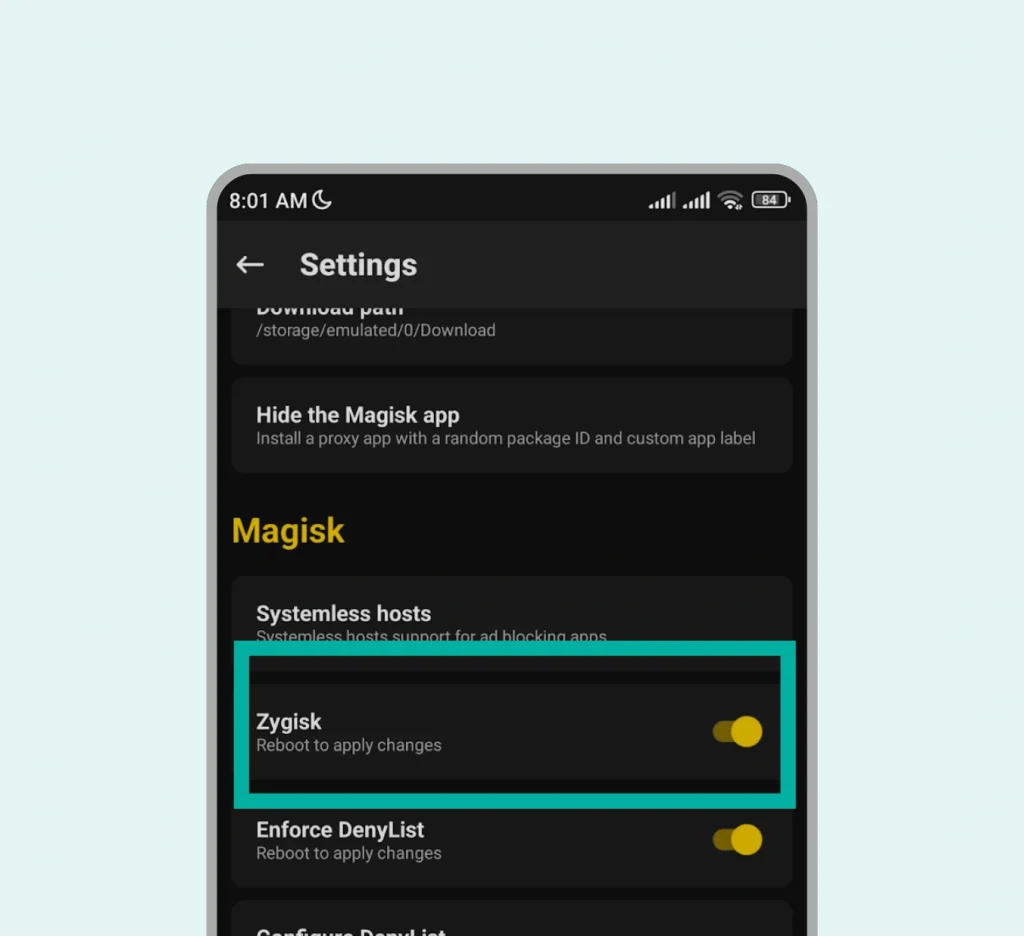
  4. If Zygisk is enabled, turn it off.
19
  1. Go back and select “Uninstall Magisk”.
20
  1. Tap on “Complete Uninstallation”.
21
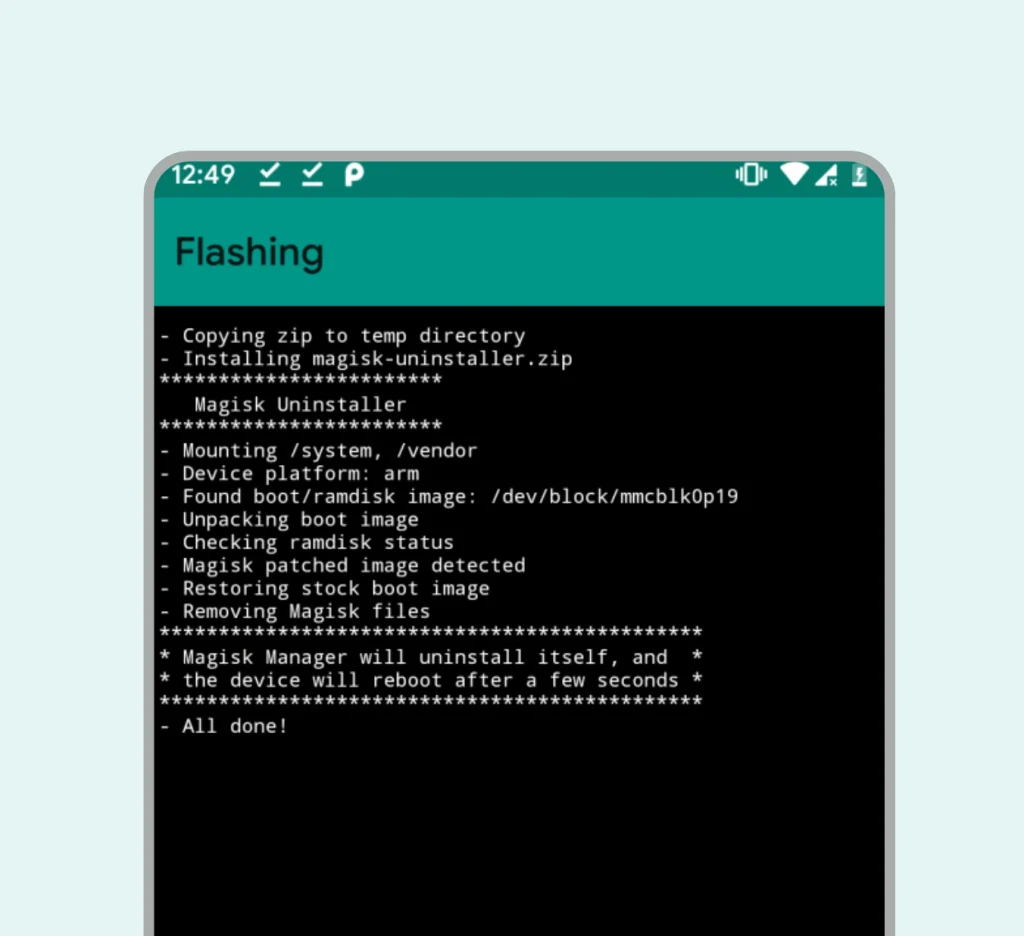
  1. Once done, your device will automatically start unrooting.
22

Magisk will be removed, and your device will automatically reboot. Just wait a bit. After 30–40 seconds, your phone will be fully booted. Magisk has been completely uninstalled, and your device is now unrooted.

Conclusion

These are the easiest methods to unroot your device. Once completed, your device will be completely unrooted and won’t be detected as rooted by any app. Manually unrooting using the uninstaller ZIP is considered the safest method.

Similar Posts

  • Magisk issues

    Magisk Issues and Troubleshooting All your problems solved under one roof All problem solutions are available here, including app crashes, Magisk APK, Kitsune, Alpha, Beta, and canary not installed, banking app detection, and SafetyNet failures. Every issue has a solution here. If you have any other issues, feel free to comment below. Is This helpful,…

  • Magisk Alpha

    Download Magisk Alpha APK Supported device 5+ App size 11 MB Latest version v28.1 Downloads 290,463,465 Per-App Control, Based on Your Mood Grant, restrict, or deny root access to any app depending on your mood. Magisk Alpha APK brings features you never even imagined — surprising users with its powerful and innovative capabilities.This isn’t a…

  • Magisk Canary

    Download Magisk Canary Github Supported device 6+ App size 10.9 MB Latest version v28.1 Developer Topjhonwhu Where there’s Magisk Canary — there are bug hunters. This isn’t your stable Magisk for daily use. It’s built for developers and advanced users who love breaking things just to fix them again. Expect bugs, crashes, and new experimental…

  • Magisk Delta

    Download Magisk Delta/Kitsune Magisk Supported device 6+ App size 12.2 MB Latest version v27.2 Developer HuskyDG Kitsune Mask For Android Root your device and run your banking apps without detection, it’s the magic of the Kitsune Mask. If you want to explore advanced features, nothing is better than Magisk Delta APK. It works like Magisk…

  • Switching Between Magisk

    Switching Between Magisk Switching between Magisk builds is as easy as a piece of cake. In this guide, we’ll show you how to move from one build to another. We’ve covered all official Magisk builds and Magisk forks. Switch from Magisk Stable to Beta If you want to move over to a beta build, here…

  • Magisk beta

    Download Magisk Beta Supported device 6+ App size 11.3 MB Latest version v29.0 Developer Topjhonwhu Report bugs – help improve Magisk This version is developed specifically for tech-savvy users — not recommended for beginners or non-technical users. It is experimental and may contain bugs. If you face issues or crashes, please report them to the…