
iOS Emoji Magisk Module for Android Devices

Android and iOS have their own distinct emoji styles. Many users prefer Apple emojis and want them on their Android phones. Now, you can use iOS emojis on your Android rooted device via the iOS Emoji Magisk Module. This is a powerful Android customization module by Magisk, specially designed to add iOS emojis to Android rooted devices.
Android root users can now use the iOS emoji style with more colorful and universally loved emojis. This guide covers everything you need to know about the iOS Emoji Module—from downloading and installing to customizing it on your Android device.
Basic Information
|
File Name |
iOS Emoji |
|
Format |
zip |
|
Version |
v 18.4 |
|
Size |
40 MB |
|
Category |
Magisk Module |
|
Price |
Free |
|
Requirement |
Android 6.0+ |
|
Published By |
Keinta15 |
|
Rating |
4.9/5 |
What’s the iOS Emoji Magisk Module?
iOS Emoji Module is a powerful Android customization tool created to replace default Android emojis with iOS-style emojis. It changes the system emoji font using Magisk. This module maintains your phone’s performance as it doesn’t modify the original system and is safe for future updates.
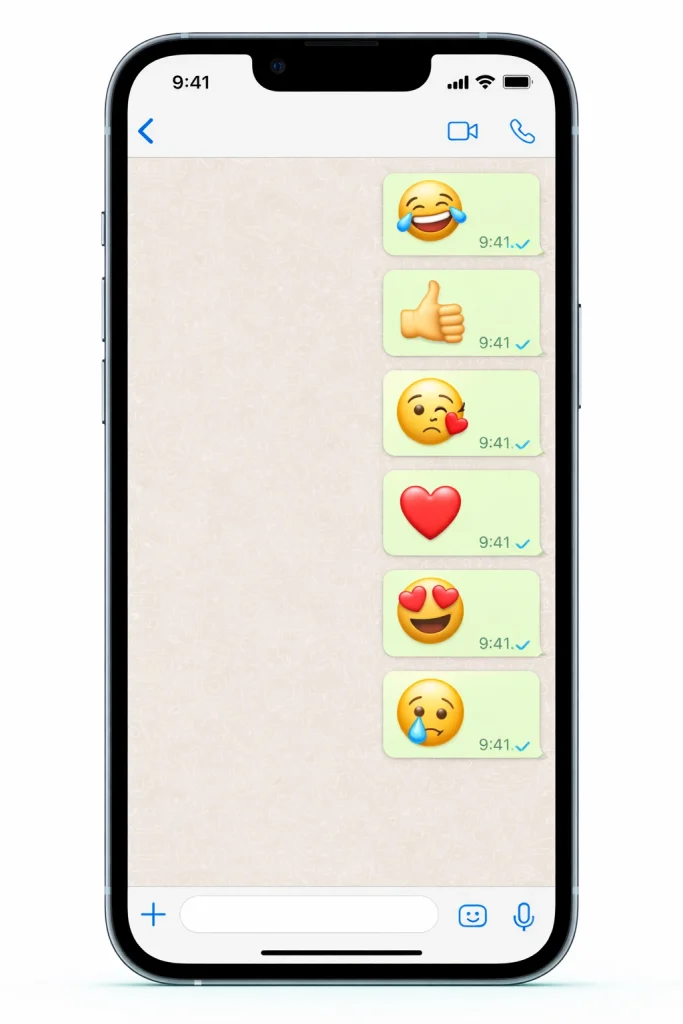
Key Features
1 System-Wide iOS Emojis
Now, after you have installed and enabled this module, you shall see iOS emojis in all applications, including those found in messaging platforms and browsers, as well as keyboards. Moreover, you are able to use iOS emojis if you want to comment using Facebook. This is also one of the reasons why it is referred to as the Facebook Emoji Magisk module.
2 Systemless Installation
As we know, Magisk modules can’t edit anything from the system partition, and, similarly, the current module won’t edit anything from the settings. This implies that:
- The module may be removed without leaving heavy files.
- You can undo the changes whenever you like.
- These changes are not likely to be modified by system updates.
3 Regular Emoji Updates
This Emoji Magisk Module is kept up-to-date with new releases of various iOS emoji styles. You are now running version 18.4, supporting all styles of iOS 17 emojis.
Requirements before installation
- Rooted Android device
- Magisk Manager already installed
- Supported Android version
How to Download & Install iOS Emoji Module
Here you will be able to find instructions on where to download the iOS Emoji Magisk file. Please follow these steps below:
- Click on the iOS Emoji Download button below.
- Open Magisk Manager on your Android device.
- Navigate to the Modules section.
- Tap on ‘Install from storage.’
- Find and choose the iOS Emoji zip file.
- Verify the installation and wait for the process to finish.
- After the installation is complete, you need to reboot the device.
Customizing iOS Emojis
You can further improve your emoji experience because the ‘iOS Emoji Magisk Module’ provides you with various options for emoji customization. Here are the details:
1 Switch Between Emoji Styles
- Download alternative emoji sets that are Magisk compatible.
- Update the existing emoji file by using the new emoji zip file through the Magisk Manager.
2 Restore Android Emojis
You can restore your old Android emojis by following the steps below:
- Open the Magisk Manager app and navigate to the Modules section.
- Disable or uninstall the iOS Emoji module.
- Reboot your device to revert to the default emojis.
Troubleshooting Common Issues
The process of installation is very simple and trouble-free but may sometimes involve some small glitches. Some basic issues and solutions are mentioned below:
Module Not Installing
Sometimes the module does not install completely on your device. This may be due to a corrupted download or an issue with Magisk Manager.
Solutions:
- Check that the iOS Emoji Module file is compatible with your Android device and downloaded through Magisk.
- Make sure you are using the latest version of Magisk.
Emojis Not Displaying Correctly
Finally, after completing the installation process of the module successfully, there may be display problems with iOS emojis. There are various reasons; this might be a result of cache or app issues.
Solution:
- Reboot your device.
- Clear the cache of WhatsApp, Telegram, and other messaging apps.
Magisk Manager Errors
In some cases, you could encounter problems with the Magisk Manager app, such as the app failing to open or not functioning properly.
Solution:
- Update Magisk Manager to the latest version.
- If the issue is not resolved, uninstall and reinstall the app.
FAQs
Conclusion
The iOS Emoji Magisk Module is an excellent choice for users who want to use iOS emojis on their Android devices. This module offers a reliable way to replace default Android emojis with the latest iOS emojis. Update your emojis now and become part of the thousands of users who are already using these emojis on their rooted Android devices.
If you have a rooted Android device and love iOS emojis, this Magisk module is definitely worth trying.


