Viper4Android FX Magisk Module: Ultimate Audio Enhancer

Sometimes, it also seems that while listening to music, the tuning is off, bass is too heavy, and other such small things you observe and can do nothing about. Now, with the Viper4Android FX Magisk module, you can personalize and fix these issues yourself. Viper4Android is a specially designed Android module for the betterment of your music experience.
The Viper4Android module helps you to customize, enhance, and fine-tune sound on rooted Android devices. It increases sound quality and takes your listening experience to the next level. This article will provide a detailed guide to the Viper4Android Magisk Module: from download and installation to complete customization.
What’s Viper4Android FX Magisk Module?
Viper4Android is an audio modification tool designed to enhance the sound quality and improve the listening experience on Android devices. The several options and features it has make it a great customizing option. The Viper4Android module works under the framework of Magisk; hence, it doesn’t affect the system partition.
Viper4Android is ideal for users seeking high-quality sound and fine-tuning audio output with precision. The high-quality module personalizes your experience in audio effects, equalizers, and sound processing for music, videos, games, and calls to give your device the impression of a premium sound system.
Basic Information
| Name | Viper4Android |
| Version | Latest |
| Category | Magisk Module |
| Android Requirement | + 6.0 |
| Published By | WSTxda |
| Last Updated | 08-07-2024 |
| Price | Free |
| Rating | 4.9/5 |
Features of Viper4Android
Viper4Android comes with a ton of features. Following are the details about these features:
- FET Compressor: A new compressor design for a smoother, more controlled audio experience.
- Quad-Channel Convolver: Supports 4-channel IRS files and provides a realistic sound experience (requires compatible IRS files).
- AnalogX: Warmer, richer sound simulating the audio signature available in v2.4.x and above.
- ViPER-DDC (Now Customizable): Provides Hi-Fi class audio quality to your headphones. (Maybe some models are not supported).
- Spectrum Extension: Emphasizes high frequencies to make music that is compressed sound.
- x86 Platform Support: Fully compatible with x86 devices, including Atom and Core i3/i5/i7 processors.
- USB/Dock Effect Support: This allows you to enhance your audio for USB and dock audio outputs.
- Speaker Optimization: Specially designed effects to improve speaker output.
- Channel Pan: Enables fine tuning of audio channels between left and right.
- Differential Surround / Haas Effect: Creates a wider and more immersive stereo soundstage.
- ViPER Fidelity Control: Enhances the overall sound accuracy and detail.
- ViPER Bass: Switches among multiple bass modes for deeper, more powerful low-frequency performance.
- ViPER Clarity: Enhances clarity, heavy bass balanced with crispy mids and highs.
- Headphone Surround+ (VHS+): Advanced surround sound technology that provides a cinema-like audio experience on Android.
- Auditory System Protection (Cure Tech+): Protects your hearing while maintaining the audio quality.
- Convolver: Provides the ability to use your own impulse response files.
- FX Compatible Mode: Ensures compatibility with other audio effects. Available in version 4.x only.
Requirements Before Installation
Before installing this module, make sure your device meets the following requirements:
- Rooted Android device
- Magisk installed
- Compatible Android version
- Full device backup
Installing ViPER4Android
Below is the step-by-step guide to install Viper4Android:
- Click the download button below to get the latest Viper4Android FX Magisk Module ZIP file.
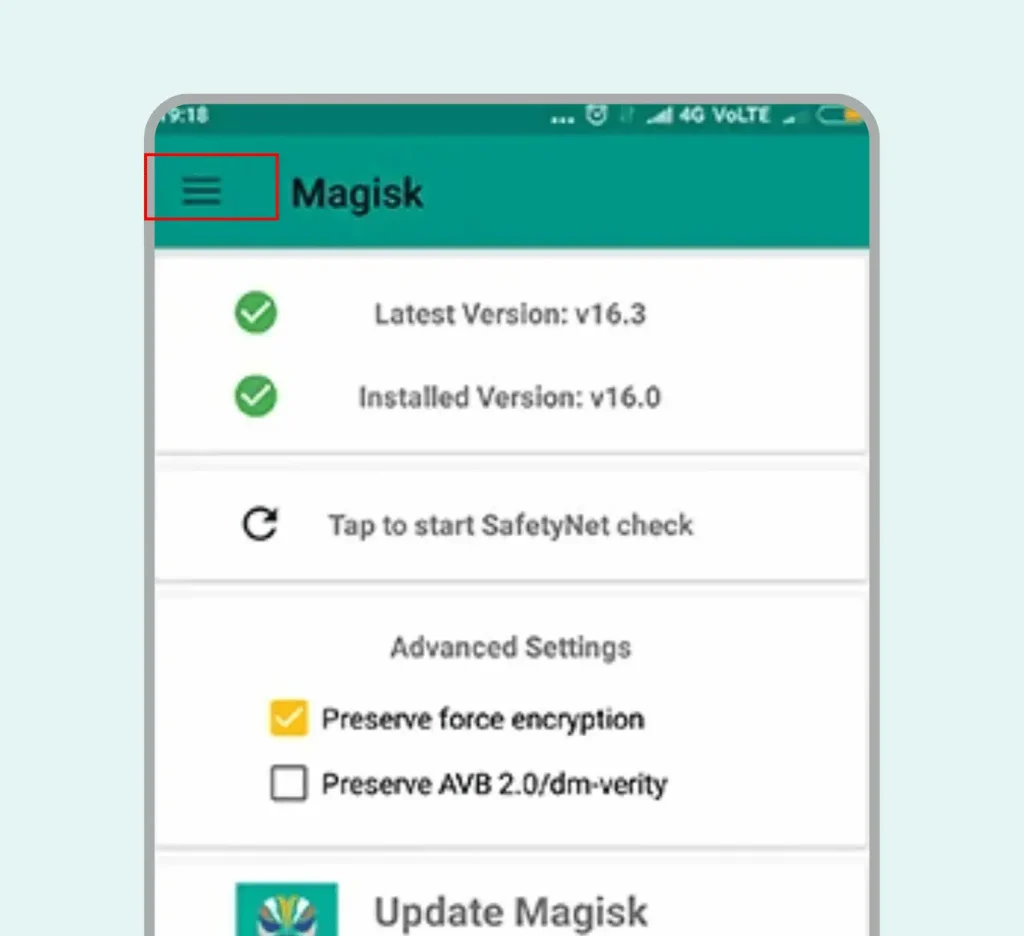
- Open the Magisk Manager app and tap the menu icon in the upper-left corner.
- Select the Modules option. You will see a yellow plus (+) button at the bottom center.
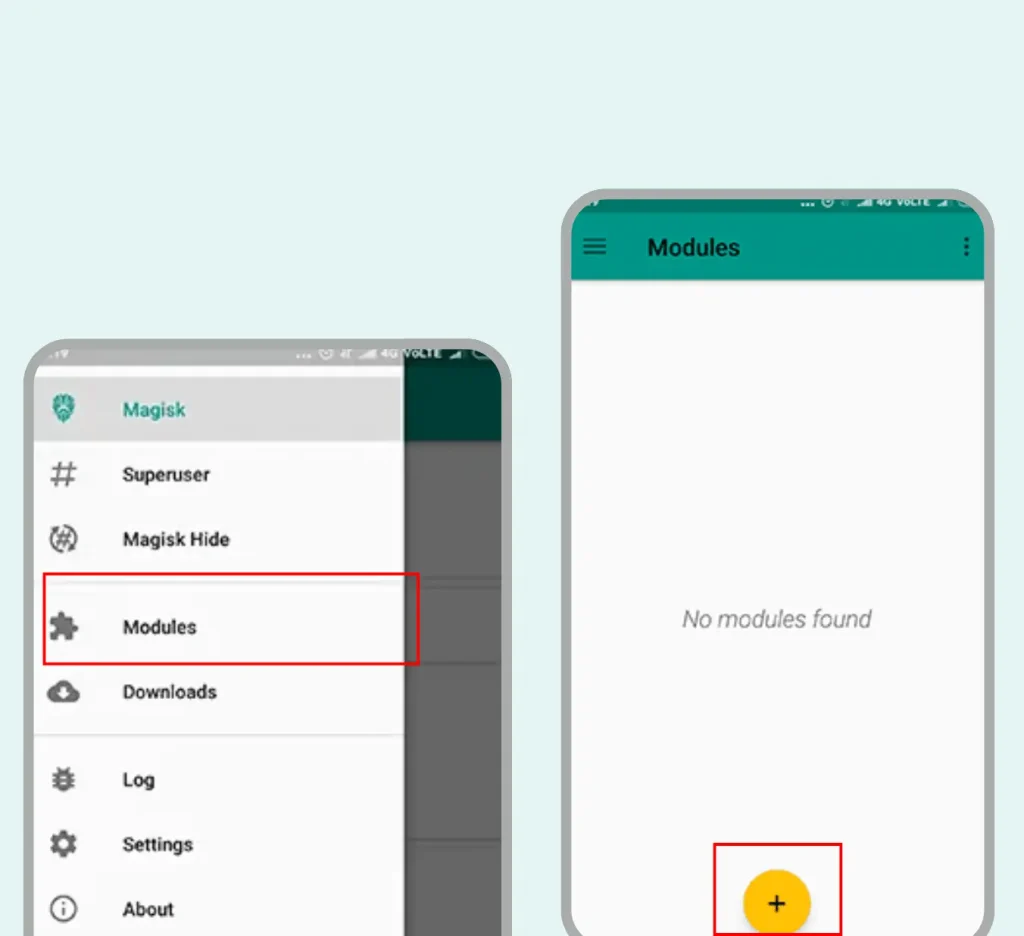
- Tap the yellow button and choose the downloaded ZIP file of the module.
- The installation process takes less than a minute to complete.
- Reboot your phone to apply the changes.
Downloading and Installation of V4A FX via Magisk Manager
- Open the Magisk Manager app on your mobile phone and tap on the menu.
- Go to Downloads and open the downloaded section in Magisk Manager.
- Tap on the search bar and search for Viper4Android.
- Select the Viper4Android FX version by Ahrion. It includes the Unity Installer, making installation easy and straightforward.
- Tap on the Download option. You will then be prompted to install it directly. The download time depends on your device and file size.
- Installation starts automatically once the download is complete. However, you need to configure Viper4Android FX during the installation process.
- Press the Volume Up key, then Volume Up again, and finally Volume Down to test the volume buttons.
- Now, select the version you want—Material or Original—using the volume buttons.
- Volume Up = Material
- Volume Down = Original
- In the final step, choose the driver you wish to install. Once the setup is complete, reboot your device.
After restarting, open the app and set up your personalized audio profile.
Advanced Tips and Tricks
Enhancing ViPER4Android with Additional Mods
- Stacking Mods: Combine the Multiple Audio mods via the Magisk and enjoy the best features of both.
- Using Dolby Atmos: Dolby Atmos helps with surround sound, while ViPER4Android boosts the bass.
Using ViPER4Android on Different Devices
- Headphones: Headphones use impulse responses that optimize the bass and clarity of sound.
- Speakers: Improve surround sound and reverb effects
- Bluetooth Devices: Adjust the playback volume to match your Bluetooth device. ViPER4Android takes your mobile audio to the next level, giving you amazing sound from the very first note.
How to Uninstall ViPER4Android
Uninstallation via Magisk
- Open the Magisk Manager app and tap on the menu.
- Tap the trash bin icon next to Viper4Android FX.
- Reboot your device to complete the uninstallation.
- Now, open your phone’s Settings and go to Apps & notifications.
- Find Viper4Android and tap on it.
- Tap Uninstall to remove it permanently.
FAQs
Final Thoughts
Viper4Android FX Magisk Module is a really strong tool that renews the whole audio experience on Android devices with exact controls, heavy bass, and immersive sound when it comes to music, movies, games, and calls. Since installation via Magisk is hassle-free, the possibility of extensive customization does not make you stop there and invites you to fine-tune anything in your audio, whether with headphones, speakers, or Bluetooth devices.